logo Verdant Arcade Hub
Home Racing Action Adventure Clicker About
Sign In
U User โ–พ
Profile Logout
  1. Home
  2. /
  3. Blue Car Racing: Arcade Driving Challenge
Blue Car Racing: Arcade Driving Challenge

Blue Car Racing: Arcade Driving Challenge

Developer: Vessel Edge Creations
Published: 1720627200
Updated: 2026-09-30
| car , racing , driving , arcade , keyboard controls , upgrade system , track variety
car racing driving arcade keyboard controls upgrade system track variety

Review

Blue Car Racing: Arcade Driving Challenge delivers a clear loop: race, earn, upgrade, and unlock new tracks. The keyboard controls and simulated weight give the blue car a tangible feel, while the garage system ties engine, tire, and aerodynamic choices directly to track performance. Adaptive AI opponents prevent races from becoming trivial. The main limitation is the lack of stated multiplayer or manual difficulty options, so players seeking direct competition may find the single-player focus narrow. It suits those who enjoy methodical improvement and tuning their car for different circuits.

About This Game

Track Design and Racing Environments

Blue Car Racing: Arcade Driving Challenge offers multiple environments, each with its own mix of corners and straight sections. The layout of each track changes how you approach a race: tight turns demand controlled braking and drifting, while long straights let you push the car to its top speed. Because every track has a distinct shape, you cannot rely on one driving style for all races. Learning the optimal racing lines and braking points per track becomes a core part of improving your results.

Handling and Upgrade System

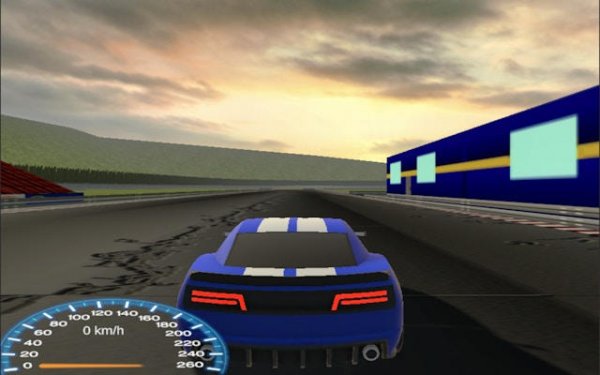
The game uses a physics engine that simulates car weight and traction, giving the blue car a sense of mass when you steer, brake, or accelerate. Keyboard controls handle acceleration, braking, and steering, and the input response is designed to be smooth with minimal lag. Between races, you visit a garage where you spend earned currency on engine, tire, and aerodynamic upgrades. These parts are not cosmetic โ€” they directly affect speed and handling, and their benefits vary depending on the track type. Choosing which part to upgrade first is a strategic decision that shapes your performance across different environments.

Competition and Progression

Each race puts you against computer-controlled drivers that provide consistent competition. The AI adapts to your skill level, so the challenge remains present as you improve. Your objective is simple: finish first. Winning races earns points and currency, which feed back into the upgrade system and unlock new tracks. The user interface keeps you informed with speed, position, and lap times, letting you judge where you lose or gain time. This loop of racing, earning, upgrading, and unlocking new tracks gives the game a clear sense of forward progress.

Driving Tips for Better Results

Mastering drifting is the most direct way to maintain speed through corners. Instead of braking hard and accelerating out, a controlled drift keeps your momentum and shortens your lap times. On straight sections, use the full speed of your car, but adjust your upgrade choices to suit the track you are racing on โ€” some tracks reward top speed, others reward grip and handling. Practicing each track to memorize its corners and braking zones will improve your consistency more than any single upgrade.


Editorial Notes

Upgrades tied to track type

The description notes that engine, tire, and aerodynamic upgrades affect performance differently depending on track type. This turns the garage into a strategic layer: you are not just buying raw speed, but tuning your car to suit specific corners and straights.

Adaptive AI keeps races close

Computer-controlled opponents adjust to your skill level, which means the game avoids the common arcade racing problem of becoming too easy after a few upgrades. The challenge scales with you, so races remain meaningful throughout the progression.

Drifting as a core skill

Drifting is presented as the key to maintaining speed through corners. This shifts the skill focus away from simple acceleration and braking toward timing and car control, rewarding players who practice the mechanic rather than those who just upgrade parts.

Compatibility

๐Ÿ’ป Desktop | ๐Ÿ“ฑ Mobile | ๐Ÿ“Ÿ Tablet
โ€“ All supported ยท Best with Chrome or Safari

Share:

Faq

What platforms can I play Blue Car Racing: Arcade Driving Challenge on?
The game is designed for keyboard input, which indicates it is a PC title. The original description does not mention mobile, console, or browser versions, so the safest assumption is that it runs on desktop computers where a standard keyboard is available.
Does Blue Car Racing: Arcade Driving Challenge have multiplayer?
No. The game features smart computer drivers as opponents. There is no mention of online or local multiplayer, so all races are against AI-controlled cars. The focus is on single-player progression and improving your own lap times through upgrades and practice.
How do I earn currency for upgrades in Blue Car Racing: Arcade Driving Challenge?
You earn points and currency by winning races. The better your finishing position, the more you accumulate. This currency is then spent in the garage on engine, tire, and aerodynamic parts. There is no other stated method of earning, so consistent race wins are the primary path to upgrading your car.
Can I customize the visual appearance of my car?
The original description mentions visual modifications alongside performance parts in the garage. While specific cosmetic options are not detailed, the game includes a customization system that lets you apply visual changes. These do not affect performance; they are separate from engine, tire, and aerodynamic upgrades.
What is the best way to improve my lap times in Blue Car Racing: Arcade Driving Challenge?
Focus on two things: learning each track's layout to find the best racing lines, and practicing drifting to carry speed through corners. Upgrades help, but they cannot replace track knowledge. Consistent practice on a single track before moving to the next will yield faster improvements than jumping between environments.
Are there different difficulty levels in Blue Car Racing: Arcade Driving Challenge?
The description states that computer-controlled opponents adapt to your skill level. This suggests a dynamic difficulty system rather than a manual selection. As you improve, the AI adjusts to keep races competitive. There is no mention of a traditional easy, normal, or hard setting, so the game likely scales automatically.

💬 Comments

0 comments
U
User
★ ★ ★ ★ ★
Please login to post a comment.
Loading comments...

⚡ You May Also Like

Sumo Arena Bounce
▶

Sumo Arena Bounce

Arena , Sumo , Casual , Arcade , Physics , Family , Multiplayer , Bounce
Crystal Path Adventure
▶

Crystal Path Adventure

Exploration , Adventure , Arcade , Casual , Family , Crystal Collection , Auto-Runner , WebGL
Droplet Expansion Arena
▶

Droplet Expansion Arena

Arena , Casual , Growth , Family , Arcade , WebGL
Doodle Arena Arcade Adventure
▶

Doodle Arena Arcade Adventure

Action , Arcade , Strategy , Family-Friendly , Casual
Arena Ball Expansion Challenge
▶

Arena Ball Expansion Challenge

Arena , Casual , Multiplayer , Arcade , Family , WebGL , Browser , Competitive
Port Bus Parking Simulation
▶

Port Bus Parking Simulation

Simulation , Driving , Parking , Precision , Family , Casual
Highway Racing Arcade Game
▶

Highway Racing Arcade Game

Racing , Arcade , Driving , 3D , Sports Car , Family
City Pursuit - Arcade Driving Game
▶

City Pursuit - Arcade Driving Game

Arcade , Car , Racing , Driving , Endless Runner , Police Chase
Verdant Arcade Hub
Verdant Arcade Hub
Home Racing Action Adventure Clicker About
Privacy Policy Terms of Use Contact Us Disclaimer
© 2026  Verdant Arcade Hub All rights reserved.
↑

Share this page

Copy the link below to share this page: