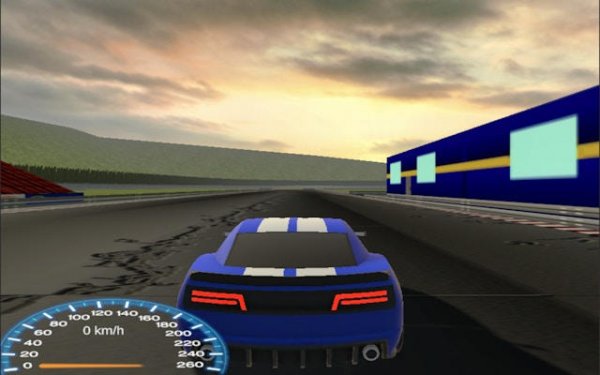
Blue Car Racing: Arcade Driving Challenge
Review
Blue Car Racing: Arcade Driving Challenge delivers a clear loop: race, earn, upgrade, and unlock new tracks. The keyboard controls and simulated weight give the blue car a tangible feel, while the garage system ties engine, tire, and aerodynamic choices directly to track performance. Adaptive AI opponents prevent races from becoming trivial. The main limitation is the lack of stated multiplayer or manual difficulty options, so players seeking direct competition may find the single-player focus narrow. It suits those who enjoy methodical improvement and tuning their car for different circuits.
About This Game
Track Design and Racing Environments
Blue Car Racing: Arcade Driving Challenge offers multiple environments, each with its own mix of corners and straight sections. The layout of each track changes how you approach a race: tight turns demand controlled braking and drifting, while long straights let you push the car to its top speed. Because every track has a distinct shape, you cannot rely on one driving style for all races. Learning the optimal racing lines and braking points per track becomes a core part of improving your results.
Handling and Upgrade System
The game uses a physics engine that simulates car weight and traction, giving the blue car a sense of mass when you steer, brake, or accelerate. Keyboard controls handle acceleration, braking, and steering, and the input response is designed to be smooth with minimal lag. Between races, you visit a garage where you spend earned currency on engine, tire, and aerodynamic upgrades. These parts are not cosmetic — they directly affect speed and handling, and their benefits vary depending on the track type. Choosing which part to upgrade first is a strategic decision that shapes your performance across different environments.
Competition and Progression
Each race puts you against computer-controlled drivers that provide consistent competition. The AI adapts to your skill level, so the challenge remains present as you improve. Your objective is simple: finish first. Winning races earns points and currency, which feed back into the upgrade system and unlock new tracks. The user interface keeps you informed with speed, position, and lap times, letting you judge where you lose or gain time. This loop of racing, earning, upgrading, and unlocking new tracks gives the game a clear sense of forward progress.
Driving Tips for Better Results
Mastering drifting is the most direct way to maintain speed through corners. Instead of braking hard and accelerating out, a controlled drift keeps your momentum and shortens your lap times. On straight sections, use the full speed of your car, but adjust your upgrade choices to suit the track you are racing on — some tracks reward top speed, others reward grip and handling. Practicing each track to memorize its corners and braking zones will improve your consistency more than any single upgrade.





💬 Comments
0 comments