logo Verdant Arcade Hub
Home Racing Action Adventure Clicker About
Sign In
U User ▾
Profile Logout
  1. Home
  2. /
  3. Classic Ludo Family Board Challenge
Classic Ludo Family Board Challenge

Classic Ludo Family Board Challenge

Developer: Grass Reapers
Updated: 2026-10-01
| Family Game , Board Game , Multiplayer , Strategy , Browser Game , Ludo
Family Game Board Game Multiplayer Strategy Browser Game Ludo

Review

Classic Ludo Family Board Challenge sticks closely to the traditional four-token race, adding browser convenience and three ways to play. The AI opponent helps newcomers learn the flow, while local and online multiplayer cover group sessions. Board themes and full-screen mode are nice touches, though the core experience remains unchanged. Best for players who want a recognizable, low-pressure board game they can start without installing anything.

About This Game

How a Match Unfolds

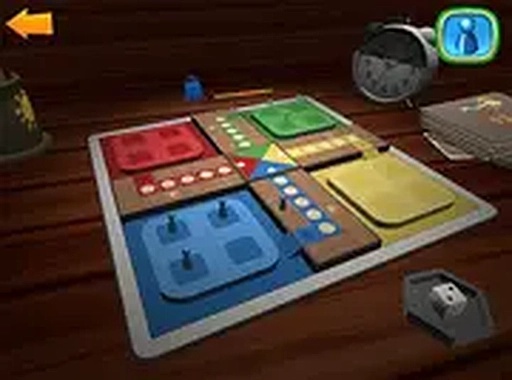
Each player controls four tokens that begin in a starting area. A single die roll determines movement, and only a six releases a token from the start. Rolling a six also grants another turn, so a lucky streak can shift momentum quickly. Tokens travel clockwise along a shared track. Landing on an opponent's token sends that token back to its start, which makes timing and positioning matter as much as luck. The first player to bring all four tokens to the center wins. The digital version follows these familiar rules, so anyone who has played the physical board game will recognize the flow immediately.

Opponents and Play Modes

You can compete against computer-controlled opponents or invite friends. Local multiplayer lets several people share the same device, while online multiplayer connects you with others over the internet. The AI provides a steady challenge for solo practice, helping new players learn turn order and token movement before facing human rivals. This flexibility supports both quick solo matches and longer sessions with family or friends.

Board Themes and Controls

Several board themes are available, letting you change the visual style without affecting gameplay. A full-screen mode offers a larger view, and the interface is designed to stay clean and easy to navigate. Keyboard and mouse controls handle all input, with clear feedback for each move. The game runs entirely in a desktop browser, so no downloads or installations are required.

Planning Beyond the Dice

While die rolls introduce chance, consistent success depends on thoughtful decisions. Spreading moves across all four tokens can create more options and reduce the risk of losing a single advanced piece. Defensive positioning helps protect tokens from being sent back, and watching opponents' positions lets you anticipate threats. The simple rules and light strategic choices suit casual players and anyone looking for a low-pressure mental challenge. Its family-friendly design makes it a practical choice for gatherings or quiet evenings at home.


Editorial Notes

Luck vs. planning balance

The six-roll rule creates swing turns, but spreading tokens and defensive positioning give skilled players ways to reduce risk. This mix keeps matches unpredictable without making decisions meaningless.

Three ways to play

Offering AI, local multiplayer, and online multiplayer in one browser game covers solo practice, same-device gatherings, and remote competition. That range is practical for families with different schedules.

No-install browser access

Running entirely in a desktop browser removes the friction of downloads and installations. For a casual board game, that convenience matters more than advanced graphics or extra modes.

✅ Compatibility & Testing

• Desktop (Windows 11, macOS Ventura)
• Mobile (iPhone 14, Samsung Galaxy S23)
• Tablet (iPad Pro, Android tablet)
✅Supported browsers: Chrome, Safari, Edge, Firefox (latest versions)
❌ Not supported: Internet Explorer, older browser versions

Share:

Faq

Do I need to download anything to play Classic Ludo Family Board Challenge?
No. The game runs entirely in a desktop browser, so you can start a match without installing files or creating an account. All you need is a compatible browser and an internet connection for online play. Local and AI matches also run directly in the browser.
Can I play Classic Ludo Family Board Challenge with friends on the same device?
Yes. Local multiplayer allows multiple people to play on the same device, so you can pass the controls around or share a screen. Online multiplayer is also available if you want to compete with friends or other players over the internet. Both modes follow the same core rules.
What happens when I roll a six in Classic Ludo Family Board Challenge?
A six is required to move a token out of the starting area. It also grants an extra turn, so you can continue rolling after a six. This rule adds unpredictability and can let a player catch up quickly. The same rule applies to AI and human opponents.
Can I change how the board looks in Classic Ludo Family Board Challenge?
Several board themes are available, and you can switch between them to suit your preference. Changing the theme only affects the visual style, not the rules or token movement. A full-screen mode is also available if you want a larger view of the board.
Is Classic Ludo Family Board Challenge suitable for children?
The game recreates the traditional family board game with simple rules and no mature content. Its family-friendly nature makes it suitable for players of all ages. Parents can feel comfortable letting children play against AI opponents or in local multiplayer sessions with supervision.
Does Classic Ludo Family Board Challenge require strategy or is it all luck?
Die rolls introduce a strong element of chance, but planning affects outcomes. Spreading moves across all four tokens creates more opportunities, and defensive positioning protects tokens from being sent back. Watching opponents' positions helps you anticipate threats. Consistent success comes from balancing luck with thoughtful decisions.

💬 Comments

0 comments
U
User
★ ★ ★ ★ ★
Please login to post a comment.
Loading comments...

⚡ You May Also Like

Pixel Color Art Studio 2
▶

Pixel Color Art Studio 2

Pixel Art , Coloring Puzzle , Casual Game , Creative , Relaxing , Browser Game
Locomotive Sphere Arena
▶

Locomotive Sphere Arena

Arena , Strategy , Action , Casual , Family-Friendly , Multiplayer , Single-Player , Puzzle
Sumo Arena Bounce
▶

Sumo Arena Bounce

Arena , Sumo , Casual , Arcade , Physics , Family , Multiplayer , Bounce
Soccer Arena Champions
▶

Soccer Arena Champions

Arena , Sports , Action , Casual , Multiplayer , Soccer
Geometric World Explorer
▶

Geometric World Explorer

Exploration , Strategy , Adventure , Casual , Open World , Geometric
Doodle Arena Arcade Adventure
▶

Doodle Arena Arcade Adventure

Action , Arcade , Strategy , Family-Friendly , Casual
Online Poke Arena Challenge
▶

Online Poke Arena Challenge

Arena , Action , Strategy , Casual , Multiplayer
Dragon Quest Arena Online
▶

Dragon Quest Arena Online

Arena , Action , Strategy , Fantasy , Adventure , Browser Game , Hero Management
Verdant Arcade Hub
Verdant Arcade Hub
Home Racing Action Adventure Clicker About
Privacy Policy Terms of Use Contact Us Disclaimer
© 2026  Verdant Arcade Hub All rights reserved.
↑

Share this page

Copy the link below to share this page: