logo Verdant Arcade Hub
Home Racing Action Adventure Clicker About
Sign In
U User ▾
Profile Logout
  1. Home
  2. /
  3. Menu
  4. /
  5. Aerial Vehicle Coloring Studio
Aerial Vehicle Coloring Studio

Aerial Vehicle Coloring Studio

Developer: Rise Pixel Games
Updated: 2026-10-01
| Art , Coloring , Creative , Children , Learning , Helicopter
Art Coloring Creative Children Learning Helicopter

Review

Aerial Vehicle Coloring Studio is a digital coloring activity aimed at young children. Its strengths are simplicity and accessibility: no downloads, no registration, no ads, and no rules beyond coloring itself. The helicopter-themed outlines, varied brushes, and wide color palette give kids room to experiment, while automatic saving supports longer projects. Parents can join in to discuss colors or aircraft parts. The main limitation is narrow scope—it is a coloring tool, not a game with challenges or progression. It suits families seeking a quiet, safe creative outlet.

About This Game

What Kids Actually Do

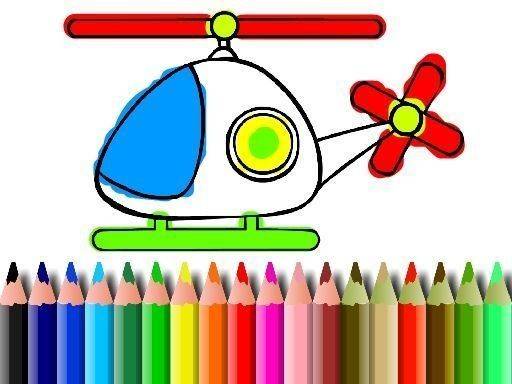
Aerial Vehicle Coloring Studio gives children a digital canvas filled with helicopter-themed outlines. The core activity is straightforward: pick a picture, choose a color, and fill in the shapes. No timer, score, or win condition exists. The only goal is the act of coloring itself, which means children can work at their own pace and change direction whenever they like. The interface is built to be intuitive enough that even very young users can navigate it without adult help.

Brushes and Color Choices

The game supplies a variety of virtual brushes that mimic different painting effects. Fine tips suit detailed areas, while broader strokes cover large sections quickly. Players can switch brushes at any moment, so a single picture might combine precise line work with wide color fills. The color palette is extensive, giving children room to mix and match hues. These choices support fine motor skill development because kids must control their movements to get the results they want.

No Setup, No Distractions

The game runs on most devices, including tablets and smartphones, without requiring downloads or registration. Its clean layout keeps attention on the coloring activity. There are no advertisements or external links, which creates a secure space for independent play. Progress saves automatically, so children can close the game and return to unfinished artwork later without losing changes. That feature is especially helpful for longer projects or for kids who like to revisit earlier pictures.

Coloring Together

Although the game is designed for solo play, it also works as a shared activity. Parents can discuss color choices or help with tricky areas, turning a coloring session into a conversation. Helicopter outlines offer a natural opening to talk about aircraft parts and how they fly, adding an educational layer without turning the activity into a lesson. This collaborative use extends the game's value beyond simple entertainment.

Editorial Notes

Open-ended design

The absence of rules, objectives, or timers is a deliberate design choice. It removes performance pressure and lets children focus on color experimentation and fine motor control rather than winning or completing tasks.

Brush variety matters

Offering both fine tips and broad strokes gives children a reason to think about tool selection. Switching brushes mid-picture encourages planning and hand control, which supports fine motor development more than a single brush would.

Automatic saving reduces frustration

Progress saves automatically, so children can leave and return without losing work. This is especially valuable for longer coloring projects and for younger users who may not remember to save manually.

Parental involvement adds value

The game is designed for solo play but explicitly supports parent participation. Discussing color choices or helicopter parts turns a simple coloring session into a shared learning moment without adding pressure.

Compatibility

✅ This game supports:
- Desktop browsers (Chrome, Edge, Safari)
- Mobile browsers (Chrome on Android, Safari on iOS)
❌ Does NOT support: - Internet Explorer - Very old browser versions
👉 Try refreshing or updating your browser

Share:

Faq

Does Aerial Vehicle Coloring Studio require a download or account?
No. The game runs in a web browser on most devices, including tablets and smartphones. There is no download, no registration, and no account creation. Children can start coloring immediately after opening the page, and progress saves automatically so they can return later without losing work.
What kind of pictures can children color in Aerial Vehicle Coloring Studio?
The game focuses on helicopter-themed outlines. Each picture is a line drawing ready to be filled with color. There are no other vehicle types mentioned, so the selection stays consistent with the aerial theme. Children choose from these outlines and apply colors freely without any rules or objectives.
Are there any advertisements or external links in the game?
No. Aerial Vehicle Coloring Studio contains no advertisements and no external links. The layout is kept clean to minimize distractions and keep focus on the coloring activity. This design choice creates a secure environment where children can play independently without encountering outside content.
Can parents join in while their child colors?
Yes. While the game is built for solo play, parents can participate by discussing color choices or helping with difficult areas. These sessions can also include simple conversations about helicopters, their parts, and how they fly. The shared activity adds an educational layer and makes the time more meaningful for both parent and child.
Does the game save a child's progress automatically?
Yes. Progress saves automatically, so children can return to unfinished artwork later without losing any changes. This is particularly useful for longer projects or for kids who like to revisit and continue working on pictures they started earlier. No manual saving is required.
What tools are available for coloring in Aerial Vehicle Coloring Studio?
Players have access to a variety of virtual brushes that simulate different painting effects. Fine tips work well for detailed areas, while broader strokes fill large sections quickly. Brushes can be switched at any moment. An extensive color palette provides many options for mixing and matching hues throughout a picture.

💬 Comments

0 comments
U
User
★ ★ ★ ★ ★
Please login to post a comment.
Loading comments...

⚡ You May Also Like

Pixel Color Art Studio 2
▶

Pixel Color Art Studio 2

Pixel Art , Coloring Puzzle , Casual Game , Creative , Relaxing , Browser Game
Pixel Art Grid Coloring
▶

Pixel Art Grid Coloring

Coloring by Cells , Puzzle , Relaxing , Creative , Family Friendly
Numbered Shade Puzzle Game
▶

Numbered Shade Puzzle Game

Color by Number , Puzzle , Relaxing , Family , Creative , Art
Colorful Bead Art Puzzle
▶

Colorful Bead Art Puzzle

Color by Number , Puzzle , Art , Relaxation , Family , Creative
Pixel Art Color by Number
▶

Pixel Art Color by Number

Pixel Art , Coloring , Puzzle , Relaxation , Creative , Family , Casual , Art
Numbered Pixel Art Coloring
▶

Numbered Pixel Art Coloring

Numbered Coloring , Pixel Art , Puzzle , Relaxing , Creative , Family-Friendly
Pixel Art Feline Workshop
▶

Pixel Art Feline Workshop

Pixel Art , Coloring , Puzzle , Relaxing , Creative , Feline
Gem Mosaic Puzzle
▶

Gem Mosaic Puzzle

Color by Number , Puzzle , Relaxing , Creative , Art , Family-Friendly
Verdant Arcade Hub
Verdant Arcade Hub
Home Racing Action Adventure Clicker About
Privacy Policy Terms of Use Contact Us Disclaimer
© 2026  Verdant Arcade Hub All rights reserved.
↑

Share this page

Copy the link below to share this page: